 FreeCircuits
 The free circuit and interval timer. No ads and no paywall.
Build your own circuits, HIIT and Tabata workouts on iPhone and iPad. Set each exercise's time and sets, add rest between exercises and rounds, then follow the big countdown ring while a voice calls out each exercise.
- £0, forever
- No ads
- No in-app purchases
- No account needed
- iPhone and iPad
The app
Three screens. That's the whole app.
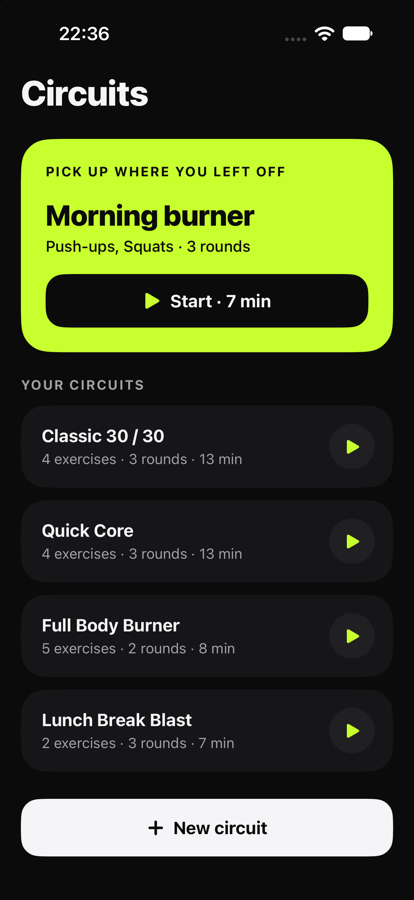
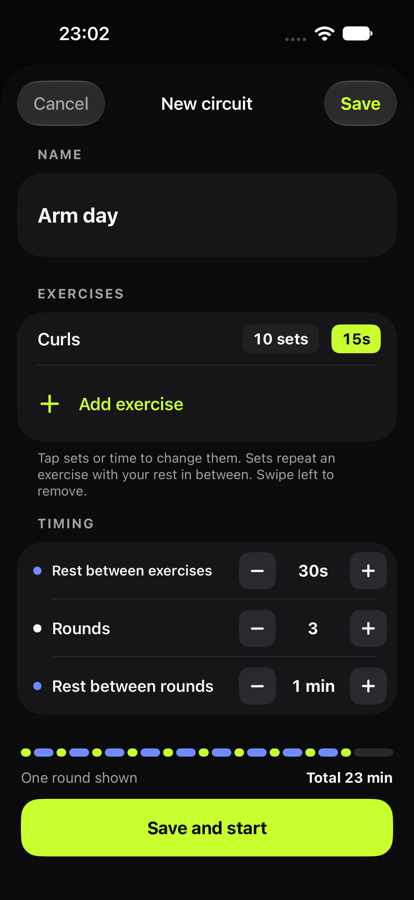
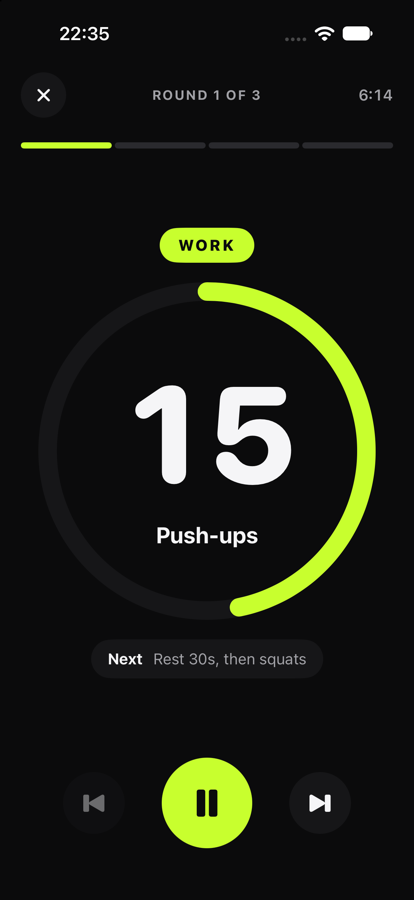
What it does
Everything a workout timer needs, all of it free
Most interval timer apps hide custom workouts or voice coaching behind a subscription. FreeCircuits has no paid tier at all.
Custom circuits
Add as many exercises as you like. Each one gets its own duration, so push-ups can be 30 seconds and a plank 60.
Sets and rounds
Repeat an exercise for several sets before moving on, and repeat the whole circuit for as many rounds as you want.
Rest where you want it
Set rest between exercises and a longer rest between rounds. The app shows the total time before you start.
Voice callouts
A voice calls out each exercise and rest as it starts, with beeps too, so you never need to look at the screen mid-set.
10-second get-ready
A short countdown before the first exercise gives you time to put the phone down and get into position.
No account needed
Everything works straight away. Sign in with Apple or email only if you want your circuits backed up and synced.
Private by design
No ads, no analytics and no tracking. Delete your account and its data from inside the app at any time.
iPhone and iPad
Runs on iOS and iPadOS 17 or later. Prop an iPad against the wall for a bigger timer.
Set it up your way
HIIT, Tabata and circuit settings
Common interval formats and how to build each one in FreeCircuits.
| Format | Work | Rest | How to set it up |
|---|---|---|---|
| Tabata | 20s | 10s | One exercise, 20 seconds, 8 sets, 10 seconds rest. 4 minutes. |
| Classic 30/30 | 30s | 30s | 4 exercises of 30 seconds, 30 seconds rest, 3 rounds. |
| HIIT 40/20 | 40s | 20s | 5 to 8 exercises of 40 seconds, 20 seconds rest, 3 to 4 rounds. |
| Strength circuit | 45s | 15s | Exercises with 3 sets each, 15 seconds between sets, 90 seconds between rounds. |
| Quick core | 30s | 15s | Plank, dead bug, side plank, hollow hold. 3 rounds. |
Free plan
The 4-week New Year circuit plan
No equipment, no gym, about 22 minutes a session. Do it three times a week, for example Monday, Wednesday and Friday. Build it once in FreeCircuits and adjust the numbers each week.
The circuit
- Squats
- Push-ups (on your knees is fine)
- Reverse lunges, alternating legs
- Mountain climbers
- Plank
One round is about 5 minutes. Four rounds with rests between them comes to about 22 minutes.
Week by week
- Week 1: 3 rounds of 40s work, 20s rest. Learn the moves.
- Week 2: 4 rounds of 40s work, 20s rest.
- Week 3: 4 rounds of 45s work, 15s rest.
- Week 4: 5 rounds of 45s work, 15s rest, or add a sixth exercise such as burpees.
Warm up for a few minutes first. If you have an injury or a health condition, check with a doctor before starting a new exercise routine.
Questions
Frequently asked questions
What is the best free circuit timer app for iPhone?
FreeCircuits is a circuit and interval timer for iPhone and iPad that is completely free, with no ads, no in-app purchases and no subscription. You build circuits of exercises with their own durations and sets, add rest between exercises and rounds, and the app talks you through each one with a large countdown ring, beeps and voice callouts.
Is there a HIIT timer app with no subscription?
Yes. FreeCircuits has no subscription, no paid tier and no ads. Every feature is free, including unlimited custom circuits, sets, rounds and voice callouts.
Can I use FreeCircuits as a Tabata timer?
Yes. For classic Tabata, add one exercise with 20 seconds of work and 8 sets, and set the rest between sets to 10 seconds. You can also make a Tabata circuit with several exercises, each lasting 20 seconds with 10 seconds of rest.
Does FreeCircuits have voice callouts?
Yes. A voice calls out each exercise and rest as it starts, alongside beeps. There is also a 10-second get-ready countdown before the first exercise, so you have time to get into position.
Do I need an account to use FreeCircuits?
No. Every timer feature works without an account, and your circuits are saved on your device. If you want your circuits backed up and synced, you can sign in with Apple or with an email address.
Does FreeCircuits have ads or track me?
No. FreeCircuits has no ads, no third-party analytics and no tracking SDKs. If you create an account, only your email, a user ID and your circuits are stored, on servers in the EU, and you can delete the account in the app at any time.
Does FreeCircuits work on iPad?
Yes. FreeCircuits runs on iPhone and iPad with iOS or iPadOS 17 or later.
Can I do sets of the same exercise in a circuit?
Yes. Each exercise has its own number of sets and its own duration. Sets repeat an exercise with your rest in between before moving on to the next exercise.
What is a good free workout timer for a New Year fitness routine?
FreeCircuits works well for a New Year routine because it costs nothing and needs no equipment or account. A simple start is 5 bodyweight exercises of 40 seconds each, 20 seconds of rest between them, 4 rounds and 1 minute of rest between rounds, which takes about 22 minutes.
How much does FreeCircuits cost?
Nothing. FreeCircuits is free in every country on the App Store, with no in-app purchases.